Country and Currency Lists in CSV: Croatia Moves to the Euro Without Touching an Address
Country and currency lists look like the most static data an application has. They aren’t. Croatia replaced the kuna with the euro on 1 January 2023. Turkey asked to be called Türkiye in 2022. Czechia has been the short name of the Czech Republic since 2016, and plenty of applications still say otherwise. Each of those changes has to reach every database the application runs on, and customers’ addresses point at those rows.
The countries example keeps both lists in CSV files, one line per row, the way such lists usually arrive. Each table’s TOML file holds only the settings and names its CSV file. Countries name their currency by code, and Bootstrapping stores the currency’s id.
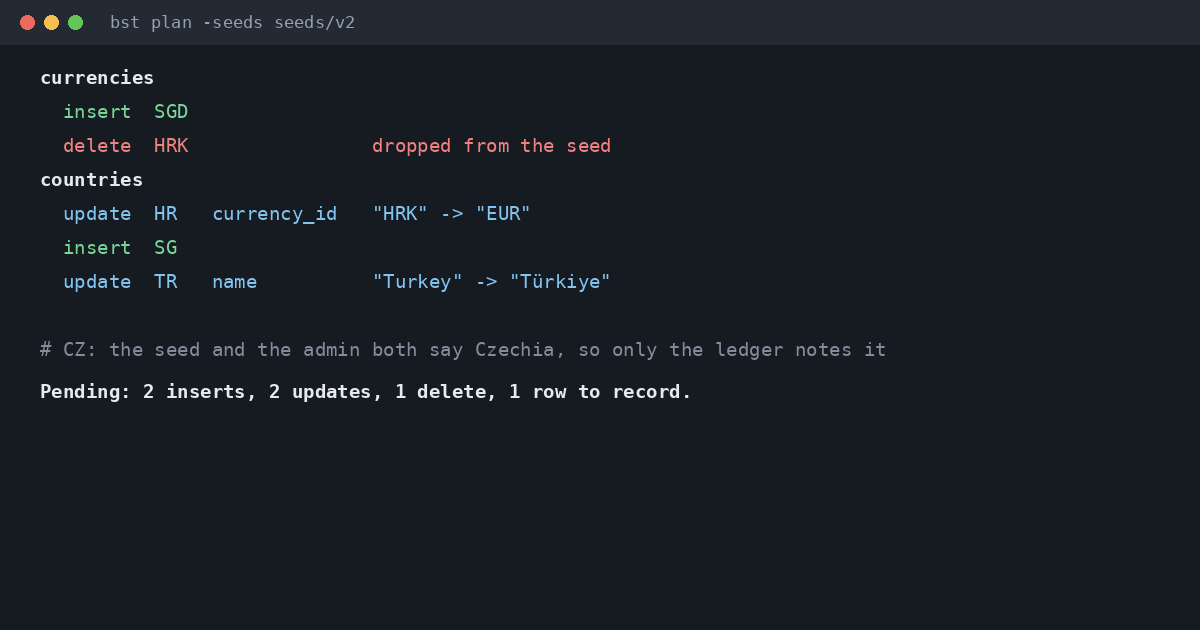 The plan for release 2, from
 bst plan.
table = "countries"
key = "code"
rows = "countries.csv"

[refs]
currency_id = "currencies.code"
One Release, Four Kinds of Change
Release 1 ships six currencies and six countries. A customer enters an address in Zagreb, and an admin shortens Czech Republic to Czechia by hand. Release 2 moves Croatia to EUR, drops HRK from the currency list, renames Turkey, renames Czech Republic as well, and adds Singapore with its dollar.
The order matters. HRK can’t be deleted while Croatia still points at it, and the database’s foreign key would refuse. Bootstrapping sees that, points Croatia at the euro first, and deletes the kuna at the end of the same transaction. The address in Zagreb never moves: it points at Croatia’s row, and that row’s id doesn’t change.
The two renames go two ways. Nobody had touched Turkey’s name, so Türkiye lands as an update. Czechia is the interesting one. The admin and the new seed made the same change, so there’s nothing to write, and only the ledger notes that the seed’s value is now in place. Had the admin written “Czech Rep.” instead, the plan would have kept the admin’s edit and said so.
Numbers From Text
Every CSV cell is text, but the table’s declared types still apply. The yen’s 0 minor units goes into an INTEGER column and is stored as the integer 0, exactly what the same value written in TOML would give. Moving a list from TOML to CSV changes nothing in the database, which the example checks along with Croatia’s currency, the deleted kuna, the untouched address and both country names.
Run it with go run ./examples/countries from a clone of the repository. The seed file format covers other delimiters and NULL markers, and the other case studies are worth a look too.